Title blocks of engineering drawings
Every drawing has a title block. Let AI read it.
Building permit files and project archives are full of drawings from dozens of suppliers, each with its own title block. The drawing number, revision and date sit there as an image, not as text, so your search system can't find them and someone types them over by hand.
Current vision models can read that title block automatically, even locally, without drawings leaving the building. That makes the drawings in your archive searchable. Below is how to approach it and what to watch for.
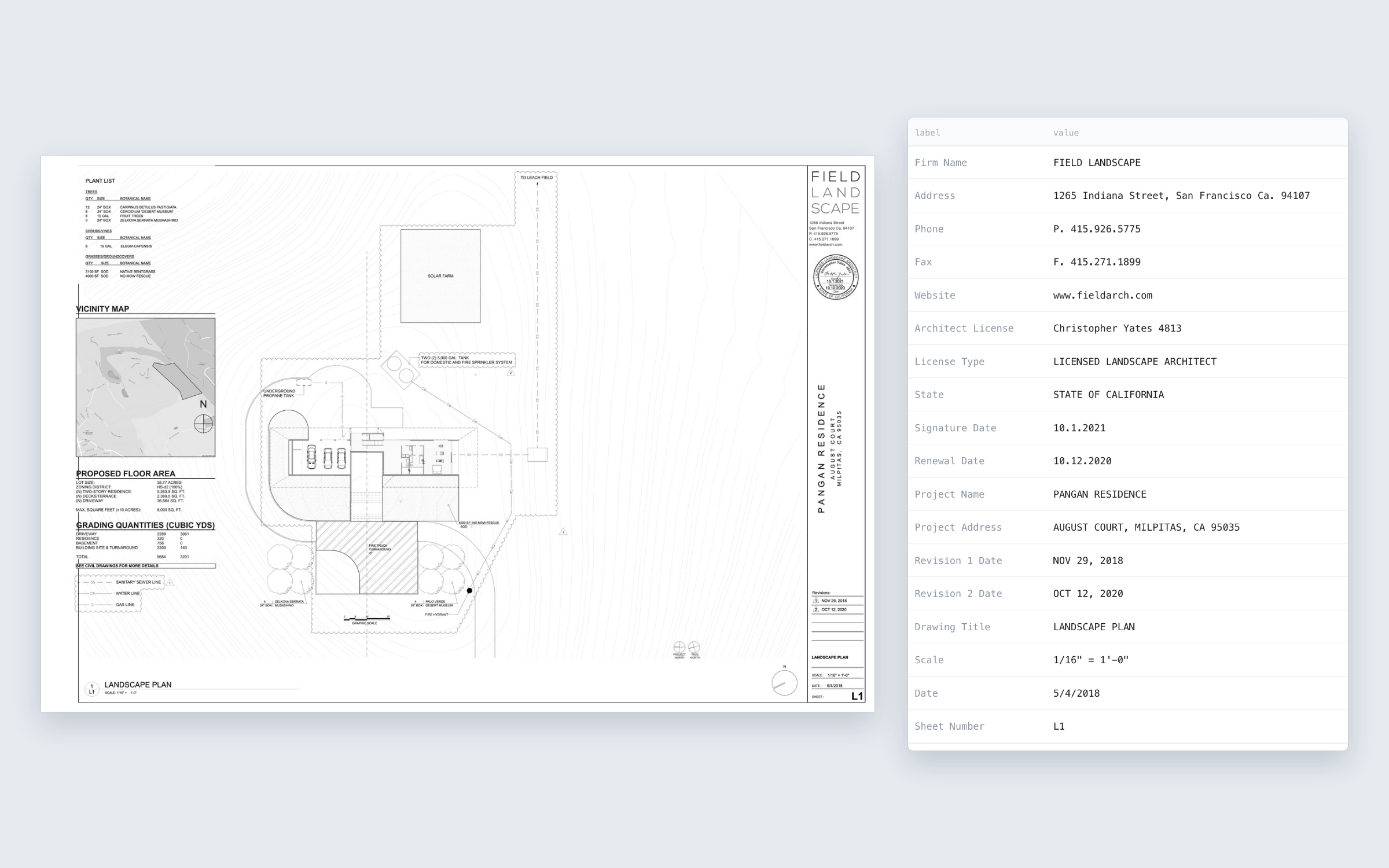
What a title block holds
- Drawing number
- Revision
- Date
- Author / drafter
- Scale
- Client
- Project
- Address
Every supplier lays out those fields differently, with different labels and often in another language.
The approach
- First find, then read
- Have a model find the title block on the sheet and crop it before it reads the fields. On a full A0 sheet the small text in the title block gets lost otherwise.
- Run it locally
- Open vision models run on your own hardware, even on a server without internet access. Then no drawing leaves the organisation, which makes the GDPR question a lot simpler.
- Scans, PDF and DWG
- A vision model looks at the image, so a scan needs no text layer. PDF and DWG are converted to an image first. Faded scans remain the hardest.
- Understand, not just read
- Plain OCR turns the image into loose text and doesn't know what belongs together. A vision model understands what it sees: it links each label to the right value, knows that Tekening nr, Drawing Nr and DRG NO mean the same thing, and sees that a bare 'Nr' in a revision block is the revision, not the drawing number.
- Open output
- Deliver the fields as CSV or JSON. You can then load them into your document management or records system and link them to the right file, without replacing anything.
- Measure, don't guess
- Keep a set of checked examples and score every change per field. The same model doesn't always give the same answer on the same drawing, so one successful test says little.
Who this is for
- Scanning and digitisation firms that digitise building permit files and now link drawings to the file by hand or with plain OCR
- Archive services and information managers with many drawings in their collections
- Municipalities with building permit files that need to become searchable
- Suppliers of document management and public-records software who want to support drawings
What we can talk about
Reviewing your approach
You have an archive full of drawings, or software that has to handle them. I help you think through what works and where it goes wrong.
Local AI in practice
Which model, on which hardware, and how to run it when drawings can't leave the building.
A session with your team
I explain how to read title blocks with AI and where the pitfalls are.

About
Dries Ketels, independent developer building AI and automation for CAD and engineering workflows.